Overview
This is a script that showcases how to mint a non fungible token by integrating the PAB executable with a web front-end.
Non fungible tokens (Nfts) are tokens that have the quantity of exactly one.
On Chain
    {-# INLINABLE mkPolicy #-}
    mkPolicy :: TxOutRef -> TokenName -> () -> ScriptContext -> Bool
    mkPolicy oref tn () ctx = traceIfFalse "UTxO not consumed"   hasUTxO           &&
                      traceIfFalse "wrong amount minted" checkMintedAmount
    where
        info :: TxInfo
        info = scriptContextTxInfo ctx

        hasUTxO :: Bool
        hasUTxO = any (\i -> txInInfoOutRef i == oref) $ txInfoInputs info

        checkMintedAmount :: Bool
        checkMintedAmount = case flattenValue (txInfoMint  info) of
            [(cs, tn', amt)] -> cs  == ownCurrencySymbol ctx && tn' == tn && amt == 1
            _                -> False
In order to make this nft we must check that the script contains the specific utxo as input.
We will delegate this task to the hasUTxo helper function here we use the any function to see if
any of the txInfoInputs from the TxInfo from the transaction info
field of the context matches the utxo for which we are validating. For better clarity we have the info
function which returns the transaction info from which it takes the script context (ctx) let's look at
the mkpPolicy. We have a policy that can only meant to burn once but of course in
that single transaction we can mint as many tokens as we want.
We want a policy that allows us to mint just one token for the currency symbol therefore it makes sense to pass
the TokenName as a parameter, and we need a second condition that checks that we mean just a specific
coin for which we have checkMintedAmount. First, we need access to the minted value
there are many ways to approaches that. We'll use the flattenValue to check that the
output is exactly one triple that matches the symbol token and value which
we expect but we still have a problem to solve. What currency symbol is given?
The currency symbol is a hash of the policy. It seems as if we have a chicken and egg issue
but we have the ownCurrencySymbol function that exists to solve this problem. We check
if the currency symbol is equal to the one we want (cs == ownCurrencySymbol) and if the token name is equal to
the token name (tn' == tn) that we have passed in and the total amount is equal to one (amt == 1).
    policy :: TxOutRef -> TokenName -> Scripts.MintingPolicy
    policy oref tn = mkMintingPolicyScript $
        $$(PlutusTx.compile [|| \oref' tn' -> Scripts.wrapMintingPolicy $ mkPolicy oref' tn' ||])
        `PlutusTx.applyCode`
        PlutusTx.liftCode oref
        `PlutusTx.applyCode`
        PlutusTx.liftCode tn

    curSymbol :: TxOutRef -> TokenName -> CurrencySymbol
    curSymbol oref tn = scriptCurrencySymbol $ policy oref tn
policy is just boilerplate code from lecture 5 (Plutus
Pioneer Program)
Off chain
    type NFTSchema = Endpoint "mint" TokenName

    mint :: TokenName -> Contract w NFTSchema Text ()
    mint tn = do
        pk    <- Contract.ownPubKey
        utxos <- utxoAt (pubKeyAddress pk)
        case Map.keys utxos of
            []       -> Contract.logError @String "no utxo found"
            oref : _ -> do
                let val     = Value.singleton (curSymbol oref tn) tn 1
                    lookups = Constraints.mintingPolicy (policy oref tn) <> Constraints.unspentOutputs utxos
                    tx      = Constraints.mustMintValue val <> Constraints.mustSpendPubKeyOutput oref
                ledgerTx <- submitTxConstraintsWith @Void lookups tx
                void $ awaitTxConfirmed $ txId ledgerTx
                Contract.logInfo @String $ printf "forged %s" (show val)
For the off chain part, we first need an utxo of our own. It is not needed to pass one because we can look it up
directly, we can just pass the TokenName. We require to get the list of utxos that belong to us.
The Contract. module gives us the utxosAt function which will help us look to get the
utxos at a given address, and we have to pass our public key address into it, in order
to get our own pub key address we can use the pubKeyAddress function. Next we write a case statement
that will either log an error if we have no utxos available or we'll use the first utxo in the
list. In the minting code we have the value as one, we want only one token to be
minted and then secondly we have the token name argument to the lookups. Now we have to provide a
lookup that gives access to where the utxos can be found. At the end of this mint function
we log the required information.
    mint' :: Promise () NFTSchema Text ()
    mint' = endpoint @"mint" mint

    nft :: AsContractError e => Contract () NFTSchema Text e
    nft = do
        selectList [mint'] >> nft

    mkSchemaDefinitions ''NFTSchema

    mkKnownCurrencies []
The remain is just boilerplate to get the endpoints.
Testing
Now let's test. We do that with a react front-end but for sure you can use curl or postman.
First, we have to start the PAB with cabal exec -- simplenft (first time, you will have to build it first)
In the second terminal we start the react site with npm start that will need some time.
In the ServiceFunctions.js file are all the functions we use to communicate with the contract.
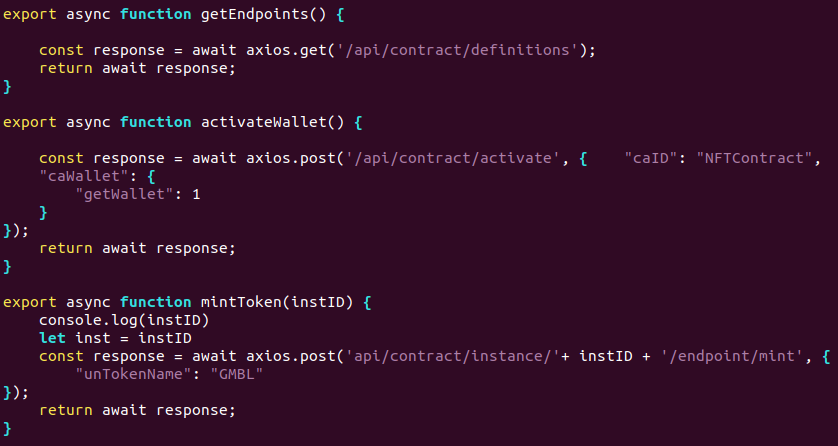
getEndpoints()gives us the available contracts we started in the PAB.activateWallet()like the name suggests activate the contract for the wallet we are using. It returns us theInstanceID.mintToken(instID)we have to pass theInstaceID. Then it calls the mint endpoint with theTokenName"GMBL" (short for Gimbalabs), you can change this by whatever you want.
In the package.json file we are defining the proxy to 9080, we have to do that because else the react site can't interact with the PAB.
If the react site has started now. You can choose between three buttons.
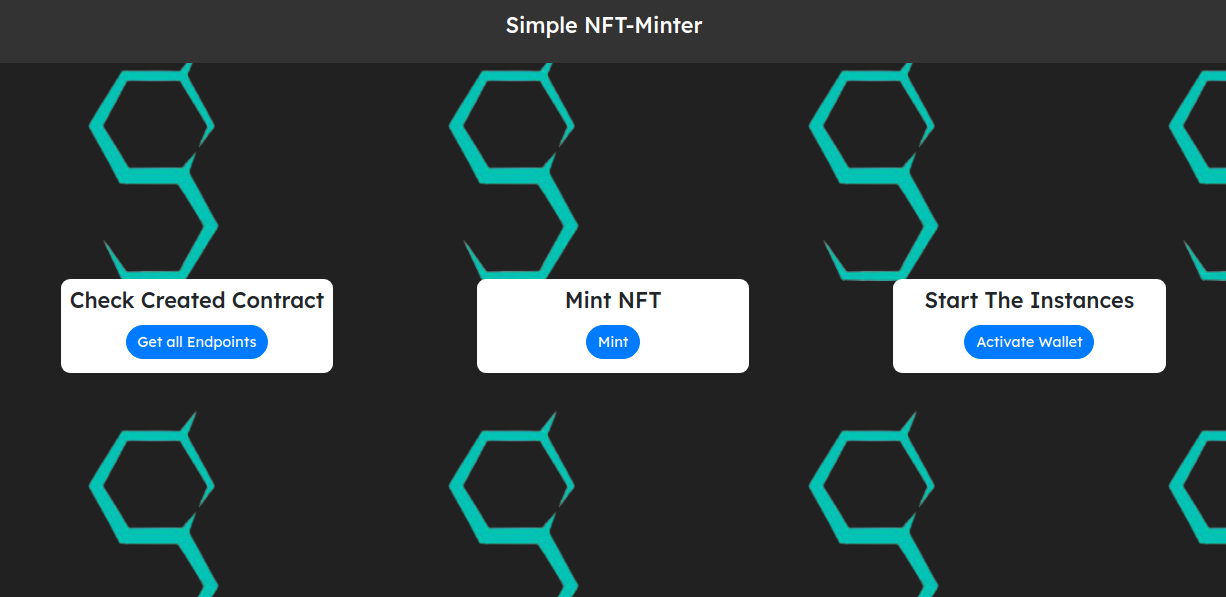
Check Created Contractthis will use thegetEndpoints()function we discussed above.Start The Instanceactivates the wallet.Mint NFTwill mint the "GMBL" token.
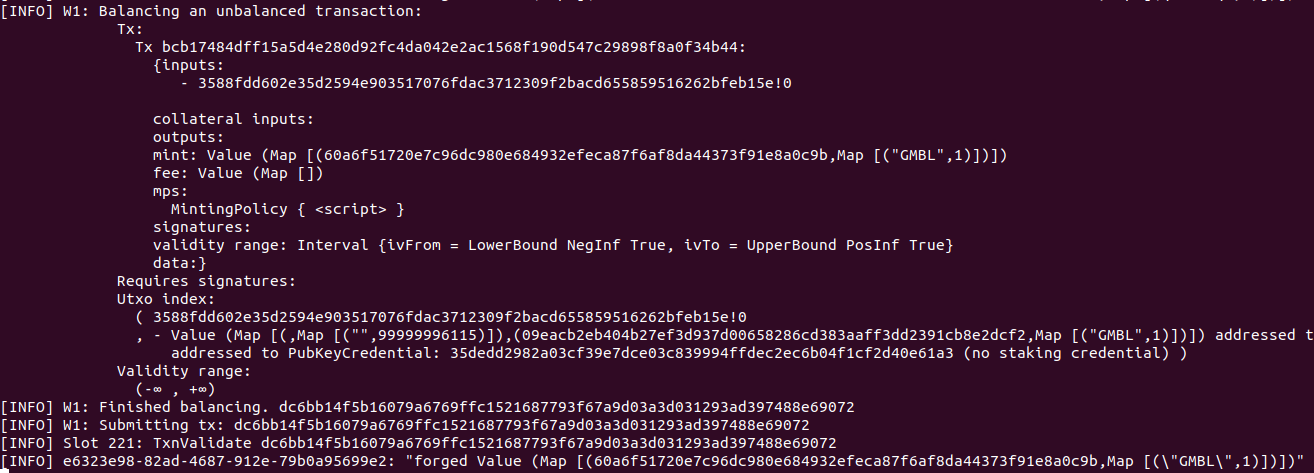
Now change to the PAB and you will see in the log what happened in the background by clicking a button. If you end the PAB, you will see that, as expect one wallet has a NFT.
Thanks to Sam who provided this example.