Overview
This is a use case for a piggy bank, built upon two kids Jack and Jill who have their own piggy banks. Dad and Mom can put money in either of their piggy banks. Jack and Jill can withdraw. Here we use the names as the parameters, whereas in practice it will be the public key hash. Additionally, the piggy bank allows emptying only when lovelace > 1M is accumulated. This smart contract demonstrates use of parameterization in Plutus contracts. The validator scripts of the piggy banks are parameterized by the name of the beneficiary.
By a parametrized script we mean one where the script address is parametrized by some value. For this example we are illustrating the parameterization with a piggybank script like the gift example from plutus pioneer program but where the script holds the value at some address with a parameter.
On chain
    newtype BankParam = BankParam
            { beneficiary :: PubKeyHash
            } deriving Show
The piggy bank script addresses are parametrized by what we call a BankParam. It's a new type which in record syntax takes a
beneficiary which is a public key hash. This means there will be a different script address for each public key hash.
    type ParameterisedPiggyBankSchema =
                Endpoint "put" PutParams
            .\/ Endpoint "empty" ()
            .\/ Endpoint "inspect" PubKeyHash
The schema is with no changes from a non-parametrized script and has three endpoints. put add
some lovelace value to a script address. empty takes your public key hash and if there are adequate funds pays them to
your wallet address, initiating the transaction. inspect takes a public key hash and checks the value at the address for the
script parametrized by that hash.
    data Bank
    instance Scripts.ValidatorTypes Bank where
        type instance DatumType Bank    = ()
        type instance RedeemerType Bank = ()
The script does not require any datum or redeemer. In the data Bank each are the unit value.
PlutusTx.makeLift ''BankParam
In order to make the bank param work as a parameter to a script address we need to include the make lift template haskell for the type which auto generates the lift instances.
Validator
    {-# INLINABLE mkValidator #-}
    mkValidator :: BankParam -> () -> () -> ScriptContext -> Bool
    mkValidator bp () () ctx =
        hasSufficientAmount &&
        signedByBeneficiary

    where
        contextTxInfo :: TxInfo
        contextTxInfo = scriptContextTxInfo ctx

        hasSufficientAmount :: Bool
        hasSufficientAmount =
            traceIfFalse "Sorry. Not enough lovelace" $ checkAmount $ inValue contextTxInfo

        signedByBeneficiary :: Bool
        signedByBeneficiary = txSignedBy contextTxInfo $ beneficiary bp
In our mkValidator function we slightly modify it from the prior examples to have a BankParam named p as the
first argument. The only other value that we're interested in, for the make validator function is the ScriptContext which
will tell us if the transaction is signed by the beneficiary and that's the fourth argument (ctx)
and you'll see it's a script context. The context helps us test things, we test two
things whether the transaction is signed by the beneficiary (signedByBeneficiary), we'll test that by using the
context info and testing if that is this signatory for the beneficiary bank program and then we're going to test if there's
more than a million lovelace we test that because if not tested then if anyone
were emptying their piggy bank and they were still going to have to pay some lovelace as the transaction fee then
they might be losing money on emptying their piggy bank which makes not much sense.
    typedValidator :: BankParam -> Scripts.TypedValidator Bank
    typedValidator p = Scripts.mkTypedValidator @Bank
        ($$(Plutusx.compile [|| mkValidator ||]) `PlutusTx.applyCode` PlutusTx.liftCode p)
        $$(PlutusTx.compile [|| wrap ||])
    where
        wrap = Scripts.wrapValidator @() @()


    validator :: BankParam -> Validator
    validator = Scripts.validatorScript . typedValidator

    valHash :: BankParam ->  Ledger.ValidatorHash
    valHash = Scripts.validatorHash . typedValidator

    scrAddress :: BankParam ->  Ledger.Address
    scrAddress = scriptAddress . validator
You'll notice that the script address (scrAddress) takes a BankParam because the validator also takes one. The bank param p in the typedValidator
is being lifted by the PlutusTx.liftCode and applied to the compiled plutus tx
make validator script.
Off chain
Endpoints
Now let's talk about the contract endpoints. These contract functions are put, inspect and empty like we
saw in the schema before.
     data PutParams = PutParams
        { ppBeneficiary :: !PubKeyHash
        , ppAmount      :: !Integer
        } deriving (Generic, ToJSON, FromJSON, ToSchema, Show)


    put :: PutParams -> Contract w s Text ()
    put pp =  do
        let bp  = BankParam
                { beneficiary = ppBeneficiary pp
                }
            tx = mustPayToTheScript () $ Ada.lovelaceValueOf (ppAmount pp)
        ledgerTx <- submitTxConstraints (typedValidator bp) tx
        void $ awaitTxConfirmed $ txId ledgerTx
        logInfo  @String $ "Added " ++ show (ppAmount pp) ++ " to scrAddress for " ++ show (ppBeneficiary pp)
The put takes PutParams like we said before and the PutParams allows us to generate
the BankParam and also to tell how many lovelace are being paid to the script that is being identified by that BankParam. We take
the typedValidator to get the script address for the transaction and we know that the transaction is going to be paying to the
script this amount of lovelace and then we wait for the confirmation of that transaction and we log how much was being paid
to the script address.
    inspect :: forall w s . PubKeyHash -> Contract w s Text ()
    inspect pkh = do
        let bp = BankParam { beneficiary = pkh}
        os  <- PlutusTx.Prelude.map snd . Map.toList <$> utxosAt (scrAddress bp)
        let totalVal = mconcat [view ciTxOutValue o | o <- os]
        logInfo @String
            $ "Logging total Value : " <> show totalVal
        logInfo @String $ "Inspect complete"
The second function's inspect which doesn't perform any transactions
it just finds the script address for a given public key hash so we make a bank program for the public key hash and we get the utxos at
the script address and we map out and collect the values using the view lens on each of those utxos
and then we log that value.
    empty :: forall w s . () -> Contract w s Text ()
    empty _ = do
        pkh <- pubKeyHash <$> ownPubKey
        let bp  = BankParam
                    { beneficiary = pkh
                    }
        utxos <- utxosAt $ scrAddress bp
        let orefs   = fst <$> Map.toList utxos
            lookups = Constraints.unspentOutputs utxos <>
                      Constraints.otherScript (validator bp)
            tx :: TxConstraints Void Void
            tx      = mconcat [mustSpendScriptOutput oref $ Redeemer $ toBuiltinData () | oref <- orefs]
        ledgerTx <- submitTxConstraintsWith @Void lookups tx
        awaitTxConfirmed $ txId ledgerTx
        logInfo @String $ "Emptied piggy bank."
The third function which is empty is where you get all the money.
It takes a unit argument and produces a contract which value we don't care. We only
care about the public key hash. The unit can be sent via json in curl with the opening closed word
brackets []. The reason it doesn't take any arguments is it already knows your pubKeyHash and therefore
can construct a bank param for you and then spends the unspent outputs to your wallet. You'll see the lookups
verifies that the other script that it spins from your own public key and so
the bp was created using your own public key (ownPubKey) and the other script is the validator at that bank param which was created with
your public key hash.
    data PutParams = PutParams
        { ppBeneficiary :: !PubKeyHash
        , ppAmount      :: !Integer
        } deriving (Generic, ToJSON, FromJSON, ToSchema, Show)


    endpoints :: Contract () ParameterisedPiggyBankSchema Text e
    endpoints = do
        logInfo @String "Waiting for empty or put or inspect."
        selectList [give', grab', inspect'] >> endpoints
         where
            give' = endpoint @"put" put
            grab' = endpoint @"empty" empty
            inspect' = endpoint @"inspect" inspect
These three are attached together in a promise at the endpoints for with the give' grab'
and inspect' which are given those keywords to be used in the schema.
Testing
Now we'll test this by using the plutus-starter.
First we'll build it by typing cabal exec -- ppb in the terminal. This might take a while if it is the first time you build it.
The PAB is running on port 9080. We are using postman (you have to download the desktop agent) to test this but you can also use curl.
Import the postman_collection.json file to your collection.
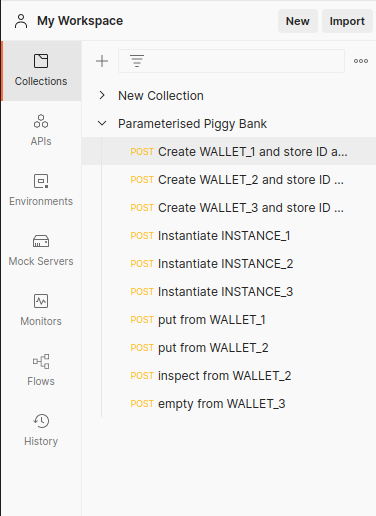
First of all we need two values whenever we create a wallet we need both the id which you could normally get from jq with one value, but we're also going to need the public key hash and so it's much easier to do that with the tests for postman but you could just as easily make an array that gets returned from the jq and store those in the array environment variable but it's up to you how you want to do that.
Now we will create wallets, three in total. Therefore, we use the Create WALLET files in the folder on the left side, choose one and click on send (right upper corner).
Then we're going to create an instance for the contract, as before, for every wallet. Using the first instance we're gonna put at the endpoint (use file put from Wallet_1).
Put using the public key hash for wallet three and we're going to be putting one million lovelace there and you'll see we get the unit [] output.

Next we do the same again but with instance 2 again to wallet 3's public key hash and then wallet 2 instance is going to inspect using the inspect endpoint what's at the script address for the public key hash for wallet three and you'll notice it just shows the unit type.
What we need to do is go back into the logs (terminal) and in the logs first you can go up and you can see the two puts, the first put with one million to the script address that is parametrized by that public key hash and then wallet 2 also put a million at the same script address because the script address is the same from either places but the wallet addresses are not the same as those addresses we're not paying directly to the wallet we're paying to the script address and you'll see, we inspected from wallet 2.

The script address has now 2 million lovelace. What we now need to do is using the empty endpoint from instance 3 which is the instance for wallet three. It emptied the piggy bank for wallet 3, what it has done is initiating the transaction to pay to wallet three the unspent outputs at the script address
Back at the terminal we end the pab, and you get the final balances and you'll see one wallet has two million or a little under 2 million you would take the lovelace transaction fees added to their balance and you'll see two other wallets that had about a million lovelace taken off.
Thanks to Eli who provided this example.